What's inside
- Quick picks by networking situation
- Cat5e, Cat6, Cat6a, Cat7, and Cat8 compared
- Shielding: when it helps and when it complicates installation
- Jacket ratings for in-wall versus desktop use
- Construction details that matter more than the category label
- A practical installation plan
- Ownership mistakes to avoid
- Quick picks by networking situation
- Cat5e, Cat6, Cat6a, Cat7, and Cat8 compared
- Shielding: when it helps and when it complicates installation
- Jacket ratings for in-wall versus desktop use
- Construction details that matter more than the category label
- A practical installation plan
- Ownership mistakes to avoid
As an Amazon Associate I earn from qualifying purchases. This post may contain affiliate links at no extra cost to you.
The best Ethernet cables for most gaming and home-networking setups are solid-copper Cat6 cables for ordinary rooms, Cat6a cables for new in-wall 10Gbps runs, and short Cat8 cables only where you actually need 25Gbps or 40Gbps over a very short distance.
As an Amazon Associate we earn from qualifying purchases at no extra cost to you.



Our Top Picks
 Jadaol Cat6/Cat6A Ethernet Cable 50FT Flat with Clips50ft3.5 x 3.5 x 0.4 inches0.4 PoundsCheck on Amazon
 Ultra Clarity Cables Cat6 Ethernet Cable 100 FT100ft6.5 x 6.5 x 0.5 Inches1.79 poundsCheck on Amazon

Quick picks by networking situation
| Situation | Best choice | Why | Typical cable length |
|---|---|---|---|
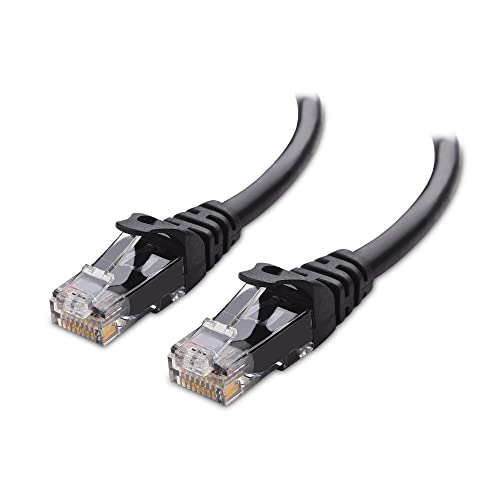
| Gaming PC or console beside the router | Cat6 UTP or slim Cat6 | Supports 1Gbps and commonly 2.5Gbps networking with easy installation | 1–5 m |
| New in-wall run in a house | Cat6a solid copper | Provides a practical path to 10Gbps over the full 100 m channel | Up to 90 m permanent link |
| Short connection between high-speed switches or servers | Cat8 shielded | Designed for 25Gbps and 40Gbps links up to 30 m | 1–30 m |
| Apartment or temporary setup | Cat6 stranded patch cable | Flexible, inexpensive, and easy to remove without opening walls | 1–15 m |
| Electrical-noise-prone area | Cat6a or Cat7 shielded, correctly grounded | Extra shielding can reduce interference near motors, power supplies, or dense cable bundles | As required |
Cat5e, Cat6, Cat6a, Cat7, and Cat8 compared
The category rating describes bandwidth and performance requirements; it does not guarantee that your internet connection will become faster. A 1Gbps broadband plan remains a 1Gbps connection regardless of whether the cable is Cat5e or Cat8. Higher categories matter mainly for local network links between a computer, router, access point, NAS, and switch.
| Category | Rated bandwidth | Typical maximum data rate | Maximum distance at headline rate | Shielding expectation | Best use |
|---|---|---|---|---|---|
| Cat5e | 100 MHz | 1Gbps | 100 m | Usually unshielded | Existing homes, basic broadband, budget upgrades |
| Cat6 | 250 MHz | 1Gbps at 100 m; 10Gbps commonly up to 55 m | Up to 100 m, depending on speed and installation | UTP or shielded versions | Most desktops, consoles, offices, and new short runs |
| Cat6a | 500 MHz | 10Gbps | 100 m | UTP or shielded versions | Future-ready in-wall cabling and 10Gbps networks |
| Cat7 | 600 MHz | 10Gbps | 100 m | Normally shielded | Specialized shielded installations; rarely necessary at home |
| Cat8 | 2,000 MHz | 25Gbps or 40Gbps | 30 m | Shielded | Short, high-speed data-center-style links |
Cat5e: still adequate for many homes
Cat5e can carry 1Gbps Ethernet to the standard 100-meter channel length, which is enough for many internet services, streaming devices, printers, and gaming systems. Replacing correctly installed Cat5e solely because a package says Cat6 usually produces no visible gaming improvement. Upgrade when the cable is damaged, poorly terminated, too short, or when you are building a new run and want more capacity.
Cat6: the sensible default for patch cables
Cat6 is the best all-round choice for most best Ethernet cables buying decisions. It has more headroom than Cat5e and is widely available in flexible patch versions, slim versions, and solid-copper bulk cable. It can support 10Gbps over shorter distances, but do not assume every Cat6 installation will deliver 10Gbps at 100 m. Bend radius, connector quality, crosstalk, and nearby cables all affect the result.
Cat6a: choose it for new walls and guaranteed 10Gbps distance
Cat6a is thicker and less flexible than Cat6, but its 500 MHz specification is designed for 10Gbps across the full 100-meter channel. For permanent wiring behind walls, ceilings, or floors, that extra capacity can be worth the more difficult installation. Terminate it in compatible keystone jacks or patch panels rather than using a long stranded patch cable as the in-wall cable.
Cat7 and Cat8: higher numbers do not automatically mean better gaming
Cat7 is primarily an ISO/IEC cabling category and is normally shielded. Many consumer cables marketed as “Cat7” use ordinary RJ45 plugs and are backward-compatible with common equipment, but the complete channel may not meet the original Cat7 connector system requirements. For a typical home, Cat6a is usually a simpler and more interoperable 10Gbps choice.
Cat8 is engineered for very high-speed short links. It is usually thick, stiff, shielded, and rated for up to 30 m at 25Gbps or 40Gbps. A Cat8 cable connected to a 1Gbps router cannot make that router deliver 40Gbps. Buy Cat8 when both endpoints support the required speed, not as a gaming latency upgrade.
Shielding: when it helps and when it complicates installation
UTP, or unshielded twisted pair, is the normal choice for homes. Twisting the four wire pairs rejects much of the interference encountered in ordinary rooms. U/FTP, F/UTP, and S/FTP cables add foil or braided shielding in different layers. Shielding is useful near fluorescent-ballast equipment, large motors, elevators, radio equipment, power inverters, or dense parallel runs beside electrical cables.
Shielding only works as intended when compatible shielded connectors, jacks, patch panels, and grounding practices are used. A shielded cable plugged into an unshielded plastic jack is not a complete shielded channel. For a normal gaming desk, unshielded Cat6 is often easier to route and less likely to create termination problems.
Jacket ratings for in-wall versus desktop use
- CM or CMG: General-purpose communications cable. Suitable for exposed desktop use and some permitted residential applications, subject to local code.
- CMR: Riser-rated cable for vertical runs between floors. It is designed to limit flame spread in vertical pathways.
- CMP: Plenum-rated cable for air-handling spaces such as certain suspended ceilings and raised floors. Its low-smoke jacket is required by many building codes in those spaces.
- LSZH: Low-smoke, zero-halogen jacket often selected for specialized commercial, marine, transit, or equipment environments. It is not a universal substitute for locally required CMP or CMR ratings.
For an ordinary desk cable, a flexible CM-rated stranded patch cable is usually appropriate. For a new wall run, use solid-copper bulk cable carrying the jacket rating required by the route. Check local electrical and building rules before routing cable through walls, ceilings, ducts, or plenum spaces.
Construction details that matter more than the category label
Solid copper versus CCA
Choose 100% bare copper conductors. Avoid copper-clad aluminum, often abbreviated CCA, for permanent Ethernet wiring. CCA has higher resistance, can perform poorly with Power over Ethernet, and may not comply with the relevant Ethernet cabling standards even when the packaging advertises Cat6 or Cat7.
Solid cable versus stranded patch cable
Solid-conductor cable is best for fixed runs because it carries signals efficiently over distance and terminates in keystone jacks or patch panels. Stranded cable is more flexible and is intended for short patch leads between a wall outlet, switch, router, computer, or console. Do not bury a thin stranded patch cable in a wall as a substitute for proper bulk cable.
Gauge, bend radius, and connector fit
Common Ethernet conductors range roughly from 22 to 28 AWG. Lower AWG numbers generally indicate thicker conductors. Slim 28 AWG patch cables save space but may have less mechanical robustness and less margin for long runs or heavy Power over Ethernet loads. Never sharply kink Ethernet cable, crush it under furniture, or exceed the manufacturer’s bend radius. Preserve the pair twists as close as possible to the connector; excessive untwisting can increase crosstalk.
A practical installation plan
- Identify the slowest device. Check the Ethernet ports on the router, switch, computer, console, and access point. A 1Gbps port sets a 1Gbps link ceiling.
- Measure the route, not the straight-line distance. Include vertical drops, service loops, and a little spare length. A 20 m route should not be served by a cable measured at exactly 20 m.
- Select the construction. Use flexible stranded Cat6 for a desk; use solid-copper Cat6a with the correct CMR or CMP jacket for a permanent 10Gbps-capable run.
- Keep separation from electrical wiring. Cross power cables at approximately 90 degrees where possible, and avoid long parallel runs. Use appropriate low-voltage supports instead of staples that crush the jacket.
- Terminate and test. Use matching jacks and a cable tester. A basic wire-map tester can find opens, shorts, crossed pairs, and split pairs; a certified tester is needed to verify full category performance.
- Check negotiated speed. After connecting the equipment, inspect the operating system or switch interface for a 1Gbps, 2.5Gbps, 5Gbps, or 10Gbps link. A “connected” status alone does not prove the expected speed.
Ownership mistakes to avoid
The connector latch is often the first part to fail on frequently moved patch cables. Boots can protect the latch, but they can also make a plug difficult to remove from tightly packed switches. Replace cables with bent plugs, intermittent links, damaged jackets, or repeated speed negotiation failures rather than repeatedly unplugging and replugging them.
Do not pay for Cat8 to solve wireless dead zones, internet congestion, or game-server latency. For most households, a correctly installed Cat6 or Cat6a cable, suitable network hardware, and a sound termination provide more useful performance than a higher category printed on the jacket. The best Ethernet cables are the ones whose speed, construction, shielding, and jacket rating match the equipment and the route.