What's inside
As an Amazon Associate I earn from qualifying purchases. This post may contain affiliate links at no extra cost to you.
A digital angle gauge is useful for setting a table saw blade to 45 degrees, but only if you use it against the right reference. The gauge measures the angle of the surface it sits on; it does not know whether your saw table is level or whether the blade’s printed scale is accurate. For a reliable bevel, zero the gauge on the saw table, then measure the blade itself.
As an Amazon Associate we earn from qualifying purchases at no extra cost to you.


Our Top Picks


What to buy for a 45-degree setup
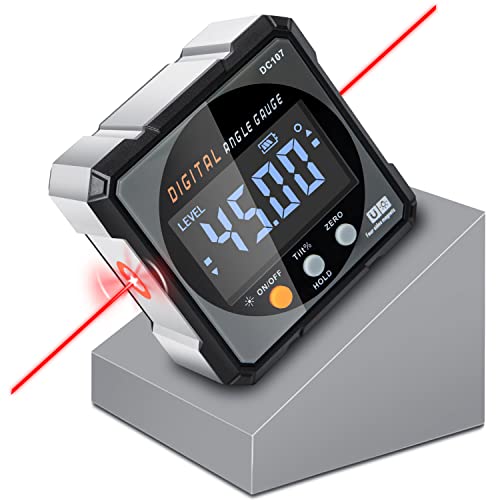
For occasional bevel cuts, a basic magnetic digital angle gauge is usually enough. Look for a clear display, a strong magnet, a zero function, and a stated resolution of 0.1 degree. A model that reads to 0.1 degree is not necessarily accurate to 0.1 degree, so check the accuracy specification too. Around ±0.2 degree is a practical target for woodworking; tighter claims can help, but they do not compensate for a dirty table or a blade that is not square to its arbor.
A compact gauge that fits the blade face is easier to use than a large one, especially on a small saw. Compare magnetic digital angle gauges by accuracy, display readability, and how securely they hold to steel. Cheap gauges can work well, but weak magnets, inconsistent zeroing, and a display that changes when you move the tool are common frustrations.
Gauge options compared
| Option | Best for | Trade-off |
|---|---|---|
| Basic magnetic digital gauge | Occasional setup and general shop use | Affordable, but quality and stated accuracy vary |
| Higher-quality digital gauge | Frequent bevel work or repeatable setups | Costs more; still needs careful zeroing |
| Bevel gauge or digital bevel box with a reference square | Checking angles without relying on a magnet | Can be slower and more sensitive to how it is held |
| Saw’s built-in scale alone | Quick rough adjustments | Often not precise enough for a clean, repeatable 45-degree bevel |
If the gauge will also be used on a miter saw, drill press, or other equipment, a more robust unit may be worth the extra cost. For one table saw and a few bevel cuts a year, a basic gauge is generally adequate. Browse digital angle gauges for woodworking and compare the stated accuracy rather than choosing by display resolution alone.
How to set the blade to 45 degrees
Unplug the saw before adjusting or measuring near the blade. Raise the blade enough to expose a broad, clean section of its side. Brush off pitch and dust: debris between the gauge and blade can tilt the reading. Avoid measuring on a tooth, gulley, or uneven carbide tip. Place the gauge body against the flat plate of the blade.
First, put the gauge on the saw table and press zero. Keep it flat and away from slots, ridges, and debris. Then place it against the blade face and tilt the blade until the display reads 45.0 degrees. Lock the bevel adjustment and take the reading again. Some saws shift slightly as the lock engages, so a final check matters more than the number shown while turning the handwheel.
On most saws, the blade leans toward the gauge from vertical, so the reading is the bevel angle relative to the table. If the display shows a negative value, the gauge may be oriented the opposite way; use the magnitude and confirm the direction of tilt. If it shows a value near 135 degrees, it may be reporting the complementary orientation. Reposition or interpret the reading consistently rather than assuming every gauge displays angles the same way.
Check the result with a test cut
A gauge reading is a setup check, not proof that the finished edge will meet another edge perfectly. Make a test cut on scrap and check the bevel with a reliable 45-degree reference, or cut two pieces and fit their bevels together. A small error becomes obvious across a long seam. For instance, a 0.5-degree error can leave a noticeable gap on a long mitre, even though the blade looks close to 45 degrees.
If the digital reading and test cut disagree, look for the source before buying a more expensive gauge. Confirm that the table is clean and the gauge returns to zero when replaced on it. Check that the blade is clean and not warped, and verify the saw’s bevel stops and locking mechanism. A loose arbor, damaged blade, or play in the tilt mechanism can defeat a precise measurement.
When a digital gauge is not the answer
A digital gauge is less useful if the saw’s table has a textured surface that prevents it sitting flat, or if the blade is too small to provide a stable contact area. In those cases, use a well-made digital bevel gauge or a suitable straight reference and verify with a test cut. A gauge with a weak magnet may slide on a dusty blade; never trust a reading if the tool rocks or moves as you touch it.
For a one-off cut, the built-in scale plus a test cut may be sufficient. For repeat work, a magnetic digital gauge makes it quicker to reset and check the blade, but careful contact and a final cut remain essential. The best purchase is the least expensive gauge that holds securely, zeros consistently, and has accuracy you can verify in your own setup.