What's inside
As an Amazon Associate I earn from qualifying purchases. This post may contain affiliate links at no extra cost to you.
Our Top Picks
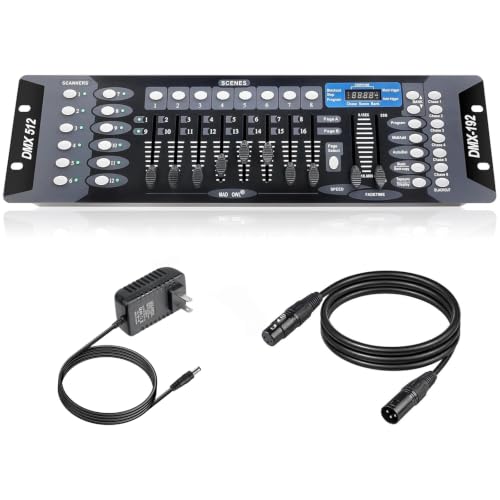


Best DMX512 Lighting Consoles for Stage Production
The best DMX512 lighting control console for stage production is one that has enough physical control for your operators, enough DMX universes for your rig, and a programming ecosystem you can support—not simply the largest channel count. For a small club, a compact console or software-based setup may be sufficient; for touring productions, prioritize multiple universes, playback controls, reliable show-file handling, and a backup plan.
Choose by venue and rig
| Production situation | Practical starting point | Why it fits | Example platform |
|---|---|---|---|
| Small club, roughly 8–16 fixtures | 1 DMX universe; compact console or computer-based control | A single universe supports up to 512 DMX slots, but fixture modes determine how quickly those slots are used. A compact rig usually benefits more from straightforward playback than extensive fader banks. | ADJ myDMX 5 for software control; ChamSys QuickQ 10 for a dedicated console |
| School, rehearsal room, or small performance venue | 1 universe; hands-on faders and direct fixture control | Physical controls can make busking and teaching easier, especially when operators rotate and need a visible, repeatable layout. | ETC ColorSource 20 |
| Community theatre or mid-size venue | 2 universes or more; cue playback, palettes, and expandable programming | More output capacity helps accommodate moving lights, LED fixtures, and future additions without redesigning the whole control setup. | ChamSys MagicQ MQ70 |
| Touring rig or complex multi-universe show | Multiple universes; high playback density, networking, and a defined backup workflow | Fast playback access and a consistent software environment matter when shows contain many cues and must be adapted to different venues. | grandMA3 onPC command wing or a grandMA3 console |
These are starting points, not fixture-count guarantees. A universe carries 512 DMX slots, and a fixture in a 16-channel mode uses 16 of them. In theory, 32 such fixtures fill one universe; in practice, leave room for additional parameters and check the console’s supported fixture count, output options, and licensing limits.
As an Amazon Associate we earn from qualifying purchases at no extra cost to you.


What to compare before you buy
Universe capacity and output method
Separate the console’s programming capacity from its physical DMX outputs. Some systems send additional universes over Ethernet using protocols such as Art-Net or sACN, while others require a compatible node or interface. Confirm both ends of the signal path: console or software output, network node, and fixture input. Also verify whether the stated universe capacity is included or depends on a license or hardware expansion.
Faders, playbacks, and programming style
Faders are useful when an operator needs immediate control of fixture groups, intensities, or effects. Playback buttons and cue stacks are better for running a rehearsed sequence. A console can have many faders but still feel restrictive if its page layout is awkward or if key controls are buried in menus.
For a club that improvises looks during a set, prioritize quick access to intensity, color, movement, and bump controls. For theatre, prioritize cue recording, timing, tracking, and dependable playback. For touring, assess how quickly an experienced programmer can build and operate the show, not just how many controls are on the surface.
Software ecosystem and fixture support
Look at fixture-library updates, offline programming, show-file compatibility, training resources, and the availability of local technical support. A familiar software workflow can be more valuable than extra capacity if it reduces setup time and operator errors. Before committing, check that the exact fixture models and modes in your inventory are supported.
Console and system options by situation
Best for a small club: ADJ myDMX 5
ADJ myDMX 5 is a software-based DMX control option suited to a compact rig where a computer is already part of the booth setup. It avoids the cost and footprint of a full lighting desk, while giving an operator programmable scenes and playback through the software environment. It is a better fit for a small, stable rig than for a touring show that depends on a dedicated surface and a tightly standardized workflow.
Budget for the required interface and verify the software’s current output and licensing details before purchase. A laptop is also a single point of failure unless you have a tested backup or a separate fallback controller.
Best for straightforward hands-on operation: ETC ColorSource 20
The ETC ColorSource 20 is a dedicated console aimed at practical control without the complexity of a large touring desk. Its fader-based approach suits schools, community venues, and smaller productions where direct access and clear playback are priorities. Check its current output capacity and expansion options against your rig before buying; the number of controls on the surface does not itself indicate how many DMX universes it can output.
Best for an upgrade path: ChamSys MagicQ MQ70
The ChamSys MagicQ MQ70 brings a more expansive programming environment for venues that have outgrown a simple one-universe setup. It is worth considering when productions need more playback flexibility, moving-light control, and room to grow. The trade-off is a deeper learning curve: plan for operator training and a show-file workflow rather than expecting the added capabilities to save time immediately.
Best for touring-scale programming: grandMA3
grandMA3 is a professional lighting-control platform designed for demanding, complex productions. Its software ecosystem and extensive playback approach can suit touring rigs, large events, and venues with dedicated lighting programmers. The system is a substantial investment in both equipment and training, so it is most compelling when the production’s scale, staffing, and rental or touring requirements justify that commitment.
A worked universe calculation
Suppose a venue has 12 LED fixtures using 16 DMX channels each, plus 8 moving lights using 24 channels each:
- LED fixtures: 12 × 16 = 192 slots.
- Moving lights: 8 × 24 = 192 slots.
- Total: 384 of 512 slots in one universe.
That fits within one universe on paper, leaving 128 slots. But if the moving lights are later switched to a 32-channel mode, the total becomes 448 slots. Add another four 16-channel fixtures and the total reaches 512 exactly, leaving no spare capacity. A second universe may be sensible before reaching that point, especially if the rig is expected to expand or its fixtures use more detailed modes.
Ownership details that affect reliability
In regular use, connectors, cables, power supplies, and computer connections are more likely to cause trouble than the console’s channel capacity. Label DMX lines, secure connectors against strain, and keep spare cables and a compatible terminator available. For networked DMX, use a clearly documented network layout and avoid treating an unmanaged venue network as a dependable show network.
Back up show files after programming changes and keep a copy on a separate device. For computer-based control, test the operating system, interface, and output path as a complete system before a show—not just the lighting software. For a dedicated desk, confirm that a replacement or backup plan exists for critical productions. The common purchasing mistake is to buy for today’s fixture count while overlooking the output hardware, training, and backup needed to run the rig reliably.
Bottom line
For a small club, start with a compact one-universe setup and a clear fallback plan. Choose a dedicated fader-based console when multiple operators need immediate, visible control. Move to a more expandable platform as cue complexity and universe count grow, and consider grandMA3 when a professional touring workflow warrants its investment and training demands. In every case, calculate DMX slots from the fixture modes you will actually use, then confirm the console and output hardware can deliver the required universes.