As an Amazon Associate I earn from qualifying purchases. This post may contain affiliate links at no extra cost to you.
Choosing a new keyboard sounds simple until you start comparing models on price, layout, and connection type. A buyer replacing a failing laptop keyboard needs something different from someone building a desktop workstation or hunting for a quiet option that won’t disturb a household. The spec sheets look nearly identical across dozens of models, yet owner feedback tells a very different story about which of these keyboards hold up after a year of daily use and which ones develop stuck keys, dropped wireless connections, or uncomfortable wrist angles within months.
What separates a good new keyboard from a mediocre one comes down to four things: consistent key travel that matches your typing style, a layout that eliminates wasted hand movement, a connection type that stays reliable over time, and software or driver support that does not break after an OS update. This roundup compares published specifications and aggregated owner reports across eight widely available models to help you identify which keyboard matches your specific setup and budget without guessing.
As an Amazon Associate we earn from qualifying purchases at no extra cost to you.




Our Top Picks
 Logitech MK270 Full Size Wireless Keyboard and Mouse1 Pack20.08 x 6.22 x 1.81 Inches1.05 poundsCheck on Amazon
 Logitech K270 Full Size Wireless Keyboard for Windows1 Pack0.75 x 5.75 x 17.25 inches1.1 PoundsCheck on Amazon
 Logitech K250 Compact Wireless Bluetooth Keyboard with Number1 Count (Pack of 1)14.56 x 5.39 x 0.9 Inches0.8 poundsCheck on Amazon


Quick Picks
| Product | Best for | Price |
|---|---|---|
| Amazon Basics Wired QWERTY | Office and everyday typing | $11.7 |
| Logitech MK270 Combo | Desktop setups wanting mouse and keyboard together | $26.99 |
| Logitech K270 Wireless | Windows users who want wireless without the mouse | $21.48 |
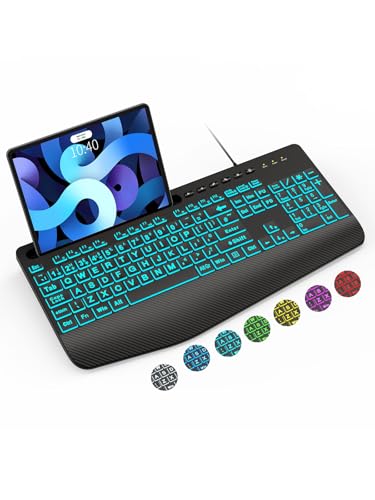
| SABLUTE Large Print Wired | Users needing bigger lettering and backlight options | $22.99 |
| KOPJIPPOM Large Print Backlit | Vision-impaired or low-light typing | $23.41 |
| Logitech K250 Compact | Bluetooth pairing across multiple devices | $19.99 |
| Redragon K668 Hot-Swap RGB | Gamers wanting hot-swappable switches on a budget | $36.99 |
| Apple Magic Keyboard | Mac users wanting native integration | $119 |
How We Picked
We filtered these eight models on four criteria: connection reliability (wired versus 2.4 GHz versus Bluetooth, and what owners report about dropped signals over months of use), layout practicality (full-size versus compact, presence of a number pad, and whether the key spacing suits long typing sessions), build quality signals (keycap material, chassis rigidity, and reported longevity in owner feedback), and price-to-feature ratio (whether the published specs justify the listed cost compared to alternatives at similar price points). Every product here is currently available for purchase and has enough owner feedback volume to identify recurring patterns rather than isolated complaints.
The 8 Best New Keyboard in 2026
Amazon Basics Wired QWERTY Keyboard
This is the keyboard you buy when you need a full-size, plug-and-play solution for an office or home desktop and want to spend as little as possible without getting a product that feels disposable. Owners consistently praise its no-driver setup and quiet membrane keys. At $11.70 it is the cheapest option in this group by a wide margin, and the included media control keys handle volume, mute, and playback without software.
- Pro: Plug-and-play with no software installation required on Windows systems.
- Pro: Lowest price in this roundup with a full number pad included.
- Con: Cable length is fixed and relatively short, limiting desk placement options.
Skip this if you want mechanical switches, Bluetooth connectivity, or a compact footprint that saves desk space.
Logitech MK270 Full Size Wireless Keyboard and Mouse Combo
Anyone building a desktop from scratch or replacing both peripherals at once will find the MK270 hard to beat on value. The single USB receiver handles both devices, the keyboard includes a full number pad, and the mouse is a basic right-handed model. Owner reports highlight battery life as the standout strength, with months of use on two AA cells. At $26.99 you are buying two devices for less than most single wireless keyboards cost.
- Pro: Single receiver manages both keyboard and mouse with no pairing steps.
- Pro: Battery life consistently praised in owner feedback as multi-month.
- Con: Mouse is basic and uncomfortable for users with larger hands.
Skip this if you already own a mouse you prefer, or if you need per-key backlighting.
Logitech K270 Full Size Wireless Keyboard for Windows
Think of this as the MK270 without the mouse, for buyers who want Logitech wireless reliability and a full-size layout but already have a pointing device. The 2.4 GHz USB receiver provides a stable connection that owners report rarely drops out. Special function keys handle volume, media, and email access. The scissor-switch membrane provides a shallow, quiet keypress that suits long typing sessions in shared spaces.
- Pro: Full-size layout including number pad at under $22.
- Pro: Spill-resistant design noted in published specs.
- Con: Requires a USB-A port, which can be a limitation on newer thin laptops.
Skip this if you have a laptop without USB-A ports or if you want Bluetooth as an alternative connection method.
SABLUTE Large Print Wired Keyboard
This new keyboard targets users who find standard lettering too small, whether due to vision limitations, aging eyes, or simply preferring larger labels for faster key identification. The 7-color backlight system lets you cycle through options to reduce eye strain in low-light conditions, and the integrated wrist rest addresses the ergonomics issue that plagues cheaper wired boards. Owner feedback highlights the large print as genuinely helpful rather than a gimmick.
- Pro: Large-print labels make key identification noticeably faster than standard boards.
- Pro: Wrist rest is built-in rather than a separate accessory.
- Con: Backlight color cycling is software-driven and not always intuitive to control.
Skip this if you type from muscle memory and do not rely on visible labels, or if you need Bluetooth wireless.
KOPJIPPOM Large Print Backlit Keyboard
Similar in concept to the SABLUTE but with a different implementation: the KOPJIPPOM uses white LED illumination under each key rather than multi-color cycling. Owners report this creates a cleaner, less distracting look in dark rooms while still providing the large-print advantage. The USB-wired connection means zero latency concerns for casual gaming or typing. It sits at a competitive $23.41 for a full-size board with backlighting.
- Pro: White backlighting is bright, even, and free of color-cycling distractions.
- Pro: Compatible with Windows desktops, laptops, and PCs out of the box.
- Con: Wired-only; no Bluetooth or 2.4 GHz wireless option available.
Skip this if your workspace has no convenient USB port near the typing position, or if you prefer multi-color RGB aesthetics.
Logitech K250 Compact Wireless Bluetooth Keyboard with Number Pad
The K250 occupies a specific niche: a wireless keyboard that connects via Bluetooth to multiple devices and still includes a number pad. Most Bluetooth boards sacrifice the number pad for size, so this is useful for anyone entering data on tablets, phones, or laptops without wanting to tether to a single device. At $19.99 it is the cheapest Bluetooth option here. The compact key spacing trades some speed for portability.
- Pro: Bluetooth connectivity eliminates the need for a USB receiver on newer hardware.
- Pro: Includes a number pad despite the compact profile.
- Con: Key spacing is noticeably tighter than full-size boards, which slows adaptation.
Skip this if you do most of your typing on a desktop and prefer the comfortable key pitch of a full-size layout.
Redragon K668 108-Key Hot-Swap Wired RGB Gaming Keyboard
Hot-swap capability at this price point is the headline feature. Owners can pull and replace individual switches without soldering, which means you can test different actuation types and swap a single failing switch without replacing the board. The 108-key layout covers a full number pad, and the four extra hotkeys provide programmable shortcuts. At $36.99 this is the most expensive option under the Apple tier, but the build quality and feature set justify the premium for anyone who wants a new keyboard with room to customize.
- Pro: Hot-swap switches eliminate the soldering barrier to customization.
- Pro: Full RGB with multiple effects and brightness levels controlled via software.
- Con: Redragon software has occasional conflicts reported in owner feedback on Windows updates.
Skip this if you want a wireless option, need a Mac-compatible board without workarounds, or prefer a minimalist desk without RGB lighting.
Apple Magic Keyboard with Numeric Keypad
This is the default choice for anyone working exclusively within the Apple ecosystem. The scissor-switch membrane provides a shallow, quiet keypress that owners consistently describe as more refined than any third-party option on this list. Bluetooth pairing with Mac, iPad, and Apple TV is instant and does not require a receiver. At $119 it costs three to four times what any other board here charges, and you are paying for build precision, battery longevity, and seamless OS integration rather than raw features.
- Pro: Pairing and connectivity with Apple devices is essentially flawless in owner reports.
- Pro: Rechargeable battery eliminates AA cell replacement; charges via Lightning or USB-C.
- Con: Price is a significant multiple of comparable third-party boards with similar layouts.
Skip this if you use Windows or Linux as your primary operating system, or if the layout differences from standard PC keyboards frustrate your muscle memory.
Buying Guide
Wired Versus Wireless: Which Connection Fits Your Setup
A wired keyboard delivers zero-latency input and never runs out of batteries, making it ideal for fixed desk positions where you do not move the typing surface. A 2.4 GHz wireless board like the Logitech K270 or MK270 adds desk flexibility but requires a USB-A receiver, which is becoming a limitation on newer laptops. Bluetooth keyboards such as the K250 connect without a receiver and support multiple devices, but they introduce a small latency penalty that matters for competitive gaming and can occasionally cause pairing issues after OS updates. If your desk layout is permanent, wired is the simpler and cheaper path. If you switch between a laptop and a tablet, Bluetooth wins on versatility.
Layout and Ergonomics: Key Spacing, Number Pads, and Wrist Position
Full-size keyboards with a number pad take up roughly two inches more horizontal space than compact models, but the time saved on data entry and spreadsheet work is real if you type numbers daily. Large-print labels help users with vision limitations, and a built-in wrist rest (as found on the SABLUTE) reduces the angle at which your wrists rest, lowering strain over long sessions. Compact layouts like the K250 tighten key spacing to fit a number pad into a smaller footprint, which can cause accidental keypresses until you adapt. Measure your desk depth before committing to a full-size board, and if you type for more than two hours at a stretch, prioritize a model with a wrist support angle that keeps your forearms neutral.
Build Quality Signals: What Owner Feedback Reveals That Spec Sheets Do Not
Published specifications rarely tell you whether keycaps will go shiny after six months, whether the cable strain relief will crack, or whether a wireless receiver will develop intermittent dropouts in the second year. Owner feedback across multiple months of use reveals these patterns. Look specifically for reports mentioning key repeat behavior (sticky keys after a few hundred hours), chassis flex under normal typing pressure, and software conflicts after Windows or macOS updates. Membrane keyboards at the low end of this list will naturally develop inconsistent actuation faster than mechanical switches, but the gap in perceived quality between a $12 board and a $35 board is smaller than the gap between a $35 board and a $120 board. Spend where the next dollar buys the most noticeable improvement for your use case.
Our Verdict
The Redragon K668 is the top pick for most buyers who want a new keyboard they can grow into. Hot-swap switches mean you can fix a single failing key or change actuation feel without replacing the entire board, the full 108-key layout covers every use case from gaming to data entry, and the price sits below the premium tier while offering customization that most boards at $50 and above do not match.
The Amazon Basics Wired QWERTY is the clear budget pick at $11.70. Nothing else in this group comes close on price while still offering a full-size layout, media keys, and plug-and-play reliability.
Condition for an alternate winner: if you work exclusively with Apple devices and value seamless switching between a Mac, iPad, and Apple TV over any customization or cost savings, the Apple Magic Keyboard with Numeric Keypad earns its premium through reliability that no third-party board matches in that ecosystem.
FAQ
Do I need software installed to use a new keyboard?
Wired keyboards and 2.4 GHz wireless models with a USB receiver work immediately without any software. Bluetooth keyboards require OS-level pairing but still do not need third-party drivers for basic typing. The exception is RGB and hotkey customization: boards like the Redragon K668 need their software utility to configure lighting effects and remap the extra keys.
Is a mechanical keyboard worth the upgrade from a membrane board?
For typists who log several hours a day, mechanical switches offer more consistent actuation and longer lifespan (typically 50 to 100 million keystrokes versus 5 to 10 million for membrane). For casual office use, the difference in feel is noticeable but the membrane board is quieter in shared spaces. The Redragon K668 bridges this gap by offering mechanical switches at a price close to premium membrane options.
Why do some keyboards require a USB-A receiver when newer laptops do not have the port?
2.4 GHz wireless keyboards use a small proprietary dongle that communicates with the keyboard on a dedicated radio frequency, which is more power-efficient and lower-latency than Bluetooth. As laptops drop USB-A ports, manufacturers increasingly offer dual-mode boards with both Bluetooth and a dongle option. If your laptop has only USB-C, look for Bluetooth models like the K250 or use a USB-C adapter.
Can a Windows keyboard work on a Mac and vice versa?
Yes, with caveats. Windows keyboards connect to Macs via USB or Bluetooth and will type correctly, but modifier key positions differ: the Windows key maps to Command and Alt maps to Option, which feels inverted until you remap them in System Preferences. Mac keyboards lack a Windows Super key and some function-row shortcuts are not recognized by Windows without software workarounds.