What's inside
- Top 3 Picks
- Quick Comparison
- How We Chose
- 1. AJAZZ AK820 – Best for Most People
- 2. Logitech G413 SE – Best for Office and Typing-Heavy Work
- 3. wegear Wired Mechanical Gaming Keyboard – Best Budget Full-Size
- 4. Merdia LED Backlit Full Size Mechanical Keyboard – Best Full-Size for Switch Tinkering
- 5. Newmen GM611 Mechanical Keyboard – Best Entry-Level Linear Board
- 6. AULA F99 Wireless Mechanical Keyboard – Best Premium Wireless All-Rounder
- 7. SOLAKAKA KI99 Pro 96% Wireless Mechanical Keyboard – Best 96% Wireless for Gaming
- 8. Snpurdiri 60% Wired Mechanical Gaming Keyboard – Best Ultra-Budget 60%
- 9. MageGee Portable 60% Mechanical Gaming Keyboard – Best Compact for Small Desks
- 10. RK ROYAL KLUDGE R98 Pro Wireless Mechanical Keyboard – Best Premium 96% for Mixed Use
- 11. GEODMAER 65% Gaming Keyboard – Best Budget 65% with Arrow Keys
- 12. RK ROYAL KLUDGE R75 Wired Mechanical Keyboard – Best 75% with a Volume Knob
- How to Choose
- Related Guides
- Top 3 Picks
- Quick Comparison
- How We Chose
- 1. AJAZZ AK820 – Best for Most People
- 2. Logitech G413 SE – Best for Office and Typing-Heavy Work
- 3. wegear Wired Mechanical Gaming Keyboard – Best Budget Full-Size
- 4. Merdia LED Backlit Full Size Mechanical Keyboard – Best Full-Size for Switch Tinkering
- 5. Newmen GM611 Mechanical Keyboard – Best Entry-Level Linear Board
- 6. AULA F99 Wireless Mechanical Keyboard – Best Premium Wireless All-Rounder
- 7. SOLAKAKA KI99 Pro 96% Wireless Mechanical Keyboard – Best 96% Wireless for Gaming
- 8. Snpurdiri 60% Wired Mechanical Gaming Keyboard – Best Ultra-Budget 60%
- 9. MageGee Portable 60% Mechanical Gaming Keyboard – Best Compact for Small Desks
- 10. RK ROYAL KLUDGE R98 Pro Wireless Mechanical Keyboard – Best Premium 96% for Mixed Use
- 11. GEODMAER 65% Gaming Keyboard – Best Budget 65% with Arrow Keys
- 12. RK ROYAL KLUDGE R75 Wired Mechanical Keyboard – Best 75% with a Volume Knob
- How to Choose
- Related Guides
As an Amazon Associate I earn from qualifying purchases. This post may contain affiliate links at no extra cost to you.
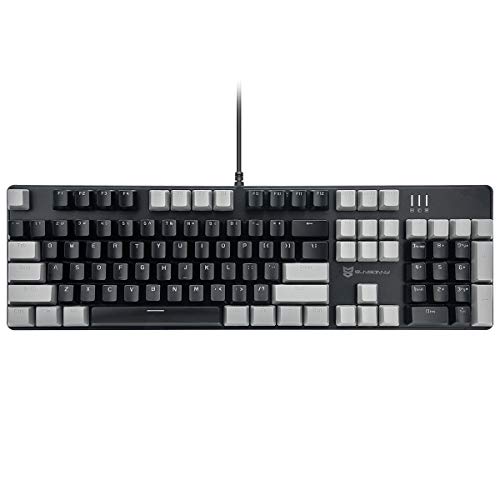
Short answer: the AJAZZ AK820 is the best overall mechanical keyboard deal to look for on Black Friday 2026 for most people — a 75% wired, hot-swappable board in the mid-range tier that keeps your arrow keys, frees desk space, and lets you change switch feel later without buying a second keyboard. If wireless matters more than anything else, the RK ROYAL KLUDGE R98 Pro is the stronger all-rounder. If you want to spend as little as possible and still get a number pad, the wegear 104-key clicky board is the budget pick. Everything below is sorted by layout, switch feel, connection type and noise, so you can match a discounted board to the way you actually work or play — not to whatever headline percentage is loudest that week.
Our Top Picks




Top 3 Picks
Best overall: AJAZZ AK820
The AK820 hits the sweet spot most shoppers are actually looking for: a 75% footprint that saves roughly a third of the desk space a full-size board takes, a hot-swap socket so a failed or disliked switch is a two-minute fix, and wired USB-C for zero latency and zero charging. It suits a single-keyboard household that games at night and types during the day.
Best budget: wegear 104-Key Wired Mechanical Gaming Keyboard
When the goal is “mechanical, full-size, cheap”, this is the one to watch. You get the full 104-key layout including the number pad, clicky switches with a clear tactile and audible response, and a wired connection that removes batteries and pairing from the equation entirely. It is the least risky way to find out whether you actually like mechanical keys.
Best premium: RK ROYAL KLUDGE R98 Pro
The R98 Pro is the pick for someone who wants one board to do everything: a 96%-style layout that keeps the number pad in a much shorter case, tri-mode connectivity across Bluetooth, 2.4 GHz and USB-C, RGB, and hot-swappable pre-lubed switches. It costs more, and it earns that by replacing two or three cheaper boards rather than sitting alongside them.
Quick Comparison
| Product | Best for | Key specs | Price tier |
|---|---|---|---|
| AJAZZ AK820 | Most people; one board for work and gaming | 75% layout, wired USB-C, hot-swappable, black | Mid-range |
| Logitech G413 SE | Typing-heavy office work with a full number pad | Full-size 104-key, tactile mechanical switches, metal top plate | Premium |
| wegear 104-Key Clicky | Lowest-cost full-size entry into mechanical keys | 104-key, wired, clicky switches, black | Budget |
| Merdia LED Backlit Full Size | Full-size board you plan to swap switches on | 104-key US layout, wired, black switches, hot-swappable, LED backlight | Mid-range |
| Newmen GM611 | Cheapest way to try linear red switches | Wired, LED backlight, red linear switches | Budget |
| AULA F99 | Premium wireless all-rounder for mixed use | Tri-mode BT5.0 / 2.4 GHz / USB-C, hot-swappable, pre-lubed linear, gasket-style build | Premium |
| SOLAKAKA KI99 Pro | 96% wireless gaming with RGB | 96% layout, wireless, RGB, hot-swappable pre-lubed switches | Premium |
| Snpurdiri 60% | Smallest possible spend on a 60% board | 60% layout, wired, red linear switches, black/white | Budget |
| MageGee MK-Box 60% | Small desks and laptop-bag portability | 68-key compact, wired, LED backlight, office-friendly footprint | Mid-range |
| RK ROYAL KLUDGE R98 Pro | One premium board for everything, including spreadsheets | 96%-style layout, tri-mode Bluetooth / 2.4 GHz / wired, RGB, hot-swappable | Premium |
| GEODMAER 65% | Budget buyers who refuse to give up arrow keys | 65% layout, 68 keys, wired, backlit, anti-ghosting | Budget |
| RK ROYAL KLUDGE R75 | 75% fans who want a volume knob and a softer typing feel | 75% layout, wired, volume knob, gasket mount, hot-swappable | Mid-range |
How We Chose
This roundup is built from published product specifications and category research, not from testing units in a workshop. Every board here was assessed on four things. First, specification honesty: layouts, key counts, connection modes, switch type and whether the socket is hot-swappable, because those are the details that decide whether a keyboard fits a desk and a workflow. Second, category fit: a board has to be a genuinely sensible answer to a real question — cheapest full-size, best 75%, best wireless under a premium budget — rather than a random listing. Third, use-case match: switch feel and noise are matched to environments, so a clicky board is not recommended for a shared office and a heavy tactile board is not the default recommendation for fast competitive play. Fourth, upgrade path: hot-swap sockets, standard keycap sizing and widely available switch formats matter more than any single spec, because they determine whether the board can be repaired and re-tuned in two years instead of replaced. Price tiers reflect general market positioning across budget, mid-range and premium bands, and those bands move constantly during sale events.
1. AJAZZ AK820 – Best for Most People
As an Amazon Associate we earn from qualifying purchases at no extra cost to you.

The AK820 is the board to start with if you are buying one keyboard and want it to still make sense in three years. A 75% layout removes the number pad and most of the navigation cluster while keeping the function row and the arrow keys, which is the compromise most people settle on after trying a 60% board and missing the arrows. It is wired over USB-C, so there is no battery to age, no pairing to redo, and no polling-rate penalty. It suits a desk where the keyboard shares space with a mouse and a monitor stand, and a user who games in the evening and types during the day.
Key specs (as listed):
- Layout: 75% — roughly 80 keys including F-row, arrows and a compact nav column
- Connection: wired, USB-C
- Switch mounting: hot-swappable socket, so switches can be pulled and replaced without soldering
- Backlight: per-key RGB on this model line
- Colour: black
- Keycap profile: standard sculpted OEM-style, which keeps third-party keycap replacement straightforward
- Price tier: mid-range
The case is plastic rather than aluminium, which is where the mid-range price comes from and also why the board stays light enough to move between rooms or toss in a bag. The real value is the hot-swap socket. A mechanical keyboard usually fails one switch at a time, not all at once, and a socketed board turns that from a “buy a new keyboard” problem into a “swap one switch” problem. If you dislike the stock switch weight after a week, you can change the whole set for the cost of a set of switches rather than a new board.
Pros
- 75% footprint frees desk space without losing arrow keys
- Hot-swappable, so switch feel is adjustable after purchase
- Wired USB-C removes battery degradation from the ownership equation
- Standard keycap sizing keeps customisation cheap and easy
- Fits both gaming and long typing sessions with the right switch swap
Cons
- No number pad, which rules it out for heavy spreadsheet entry
- Wired only — no Bluetooth or 2.4 GHz option
- Plastic case transmits more typing resonance than a metal chassis
- Compact nav column takes a few days to relearn
How it compares: against the RK ROYAL KLUDGE R75, the AK820 gives up the volume knob and the gasket-mounted feel in exchange for a lower price. If you never touch a volume dial and want the cheaper board, the AK820 wins; if you adjust volume constantly or prefer a softer, more cushioned bottom-out, the R75 is the better mid-range 75%. Against the MageGee MK-Box, the AK820 keeps arrow keys and a function row that the 68-key compact board sacrifices.
2. Logitech G413 SE – Best for Office and Typing-Heavy Work

The G413 SE is the pick for someone who types far more than they game and wants a full-size board that looks like office equipment rather than a light show. It is a 104-key layout with a metal top plate, tactile mechanical switches, and a black finish that reads as professional on a desk in a meeting room or a home office. It suits accountants, writers, developers and anyone who lives in the number pad. It is not the board for someone who wants to swap switches, change keycaps weekly, or chase the softest possible typing sound.
Key specs (as listed):
- Layout: full-size, 104 keys, including number pad and full navigation cluster
- Switch type: tactile mechanical switches — a bump you can feel at the actuation point without a loud click
- Top plate: brushed metal, which adds rigidity and reduces case flex under heavy typing
- Connection: wired USB
- Keycaps: textured, wear-resistant finish on this model line
- Backlight: white/limited lighting rather than full RGB
- Price tier: premium
The tactile switch choice is the defining feature for office use. Tactile switches give a physical confirmation at the moment the key registers, which reduces the habit of bottoming out hard — one of the main causes of hand fatigue in long typing sessions. They also produce far less high-frequency noise than clicky switches, which matters in an open-plan office or a shared room. The metal top plate is the second reason this board is positioned as premium: a rigid plate makes the typing sound more consistent from the middle of the board to the edges, and it resists the slight flex that cheaper plastic trays develop over years of use.
Pros
- Full 104-key layout with a real number pad
- Tactile switches suit long typing sessions and reduce heavy bottoming out
- Metal top plate adds rigidity and a more consistent sound
- Restrained look is appropriate in a workplace
- Wired connection means no charging, no pairing, no latency
Cons
- Premium tier pricing for a board without RGB or wireless
- Not hot-swappable — switch replacement is not a user-level job here
- Full-size footprint takes significant desk depth
- Tactile switches are noticeably heavier in feel than light linear options
How it compares: against the Merdia full-size hot-swappable board, the G413 SE trades switch flexibility for build rigidity and a more polished finish — Merdia lets you change switches, Logitech gives you a stiffer, more consistent chassis. Against the wegear 104-key clicky board, the G413 SE is the quieter and more durable option at a higher tier; the wegear is the one to buy if the budget ceiling is the deciding factor and noise is not a concern.
3. wegear Wired Mechanical Gaming Keyboard – Best Budget Full-Size

The wegear 104-key board is the answer to a very specific question: what is the cheapest way to get a full-size mechanical keyboard with a number pad and a wired connection? It suits a first-time mechanical buyer, a secondary desk, a kid’s first gaming setup, or an office workstation where a keyboard occasionally walks away and you would rather it not be expensive. It does not suit someone who wants to customise switches, chase a soft typing sound, or use the board in a quiet shared room, because clicky switches are deliberately loud.
Key specs (as listed):
- Layout: full-size, 104 keys, including number pad and navigation cluster
- Switch type: clicky — a tactile bump plus an audible click at actuation
- Connection: wired
- Colour: black
- Backlight: illuminated key legends on this model line
- Keycaps: ABS plastic, the standard at this price point
- Price tier: budget
Clicky switches are the honest trade-off here. They are the most satisfying switch type for many people, because the click confirms registration in both feel and sound, and they are also the loudest. In a room with other people, that click carries. The practical upside is that clicky boards encourage a lighter typing style — you learn to release the key as soon as you hear the click rather than pressing it to the floor of the case, which is gentler on fingers over a long day.
ABS keycaps are the second trade-off. ABS is softer than PBT and develops a shine on the most-used keys — usually the home row and the spacebar — after a year or two of heavy use. That is cosmetic, not functional, and at the budget tier it is the expected outcome rather than a defect. The wired connection, on the other hand, is a genuine advantage: no battery to degrade, no charging cable to hunt for, and a consistent polling rate.
Pros
- Full 104-key layout at the lowest price tier
- Clicky switches give clear audible and tactile confirmation
- Wired connection avoids batteries and pairing entirely
- Low enough cost to treat as a second or spare board
- Standard layout means no relearning muscle memory
Cons
- Too loud for shared offices, bedrooms with sleeping partners, or open-plan spaces
- Not hot-swappable — switch failure means replacing the board
- ABS keycaps will shine with heavy use
- Full-size footprint takes the most desk space of any layout
How it compares: against the Newmen GM611, this board gives you a number pad and clicky feedback, while the GM611 gives you linear red switches and a quieter, lighter keypress for a similar budget-tier spend. Against the Merdia full-size, the wegear is cheaper but you lose hot-swap sockets and switch choice — the Merdia is the better long-term buy if the budget can stretch to the mid-range tier.
4. Merdia LED Backlit Full Size Mechanical Keyboard – Best Full-Size for Switch Tinkering
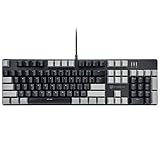
The Merdia full-size board is for the person who wants a number pad and also wants the freedom to change how the keyboard feels without buying a new keyboard. It is a 104-key US-layout board with black switches, an LED backlight and hot-swappable sockets. It suits a home office user who types all day, a tinkerer who wants to experiment with switch weights, and anyone who has already learned that their taste in switches changes after a month. It is not for someone who wants wireless, and it is not a premium build — this is a mid-range board that spends its budget on sockets rather than on a metal chassis.
Key specs (as listed):
- Layout: full-size, 104 keys, US ANSI layout
- Switch type: black switches — linear, meaning no bump and no click, with a heavier spring than red linears
- Hot-swappable: yes, switches can be pulled and replaced without soldering
- Backlight: LED illuminated
- Connection: wired
- Colour: black
- Price tier: mid-range
Linear black switches are the key detail. Linear means the key travels straight down with no tactile bump and no audible click, so the only feedback is bottoming out. Black linears typically use a heavier spring than red linears, which makes accidental keypresses less likely for people with heavy hands but tiring for people who type lightly. The hot-swap socket is what makes that a fixable problem rather than a permanent one: if black switches feel too heavy after two weeks, a set of lighter linears or tactiles can be dropped in.
For a full-size board, hot-swap is rarer than it should be, and it is the single most useful feature for long-term ownership. Mechanical switches are usually rated in the tens of millions of actuations, so a switch failure is uncommon but not impossible, and dust ingress into a switch housing is the most common cause. With sockets, that is a two-minute repair with a switch puller.
Pros
- Full 104-key layout with a real number pad
- Hot-swappable sockets allow switch changes and easy repairs
- LED backlight helps in dim rooms
- US ANSI layout keeps keycap replacement simple
- Linear switches are quieter than clicky options
Cons
- Wired only — no Bluetooth or 2.4 GHz
- Black linears are heavier than many typists prefer out of the box
- Plastic case, so more resonance than a metal-bodied board
- Full-size footprint is the least space-efficient layout available
How it compares: against the Logitech G413 SE, the Merdia gives up the metal top plate and the polished finish but gains switch sockets — if you value the ability to re-tune the board over two or three years, Merdia is the better mid-range buy. Against the RK ROYAL KLUDGE R98 Pro, the Merdia is cheaper and keeps the full-size layout, but the R98 Pro adds wireless, RGB and a more compact 96% case for a premium-tier price.
5. Newmen GM611 Mechanical Keyboard – Best Entry-Level Linear Board

The GM611 is the cheapest sensible way to find out whether you prefer linear switches. It is a wired board with an LED backlight and red linear switches, and it suits a first mechanical keyboard, a bedroom gaming setup, a laptop user who wants a real keyboard at a fixed desk, and anyone who wants quiet-ish keypresses without paying mid-range prices. It does not suit someone who needs a number pad, someone who wants wireless, or someone who intends to swap switches later.
Key specs (as listed):
- Switch type: red linear — smooth travel, no bump, no click
- Connection: wired
- Backlight: LED illuminated
- Brand: Newmen, an established peripheral manufacturer
- Keycaps: ABS at this tier
- Price tier: budget
Red linear switches are the default recommendation for gaming for a reason: the actuation point is reached without a bump, so rapid repeated presses feel consistent, and the spring weight is light enough that fast tapping does not fatigue a finger. For typing, light linears are a matter of taste — some people love the smoothness, others miss the tactile confirmation and end up bottoming out hard. If you have never used a mechanical keyboard, this is a low-cost way to find out which camp you are in before spending mid-range or premium money.
The trade-off at this tier is that you are buying a board, not a platform. There is no hot-swap socket mentioned in the listing, so the switch feel you get is the switch feel you keep. There is also no wireless, which is a genuine positive for reliability: a wired board never wakes up late, never drops a keystroke during a Bluetooth handshake, and never needs a charge cable. For a fixed desk, that is all upside.
Pros
- Lowest-cost route to linear switch feel
- Light, smooth keypress is comfortable for long sessions
- Quieter than clicky switches at the same tier
- LED backlight for dark rooms
- Wired connection keeps latency and reliability predictable
Cons
- No number pad on this layout
- Not hot-swappable — no switch changes or easy repairs
- ABS keycaps will show shine over time
- No wireless option
How it compares: against the wegear 104-key clicky board, the GM611 is the quieter, lighter-feeling choice and the wegear is the one with a number pad and audible feedback. Against the Snpurdiri 60%, both sit in the budget tier, but the GM611 keeps a wider layout with function keys while the Snpurdiri strips down to 60% — pick the Snpurdiri only if desk space is the hard constraint.
6. AULA F99 Wireless Mechanical Keyboard – Best Premium Wireless All-Rounder

The F99 is the premium pick for someone who wants one wireless board to cover work, gaming and travel between rooms. It is tri-mode — Bluetooth 5.0, 2.4 GHz wireless and USB-C wired — with hot-swappable sockets and pre-lubed linear switches, in a compact layout that keeps most of what a full-size board offers. It suits a hybrid worker who moves between a desk and a sofa, a gamer who wants 2.4 GHz for latency and Bluetooth for a laptop, and a tinkerer who wants a board that feels custom out of the box. It does not suit someone who needs the absolute lowest price, and it does not suit someone who wants clicky feedback.
Key specs (as listed):
- Connection: tri-mode — Bluetooth 5.0, 2.4 GHz wireless, USB-C wired
- Switches: pre-lubed linear, factory-lubricated to reduce friction and stabilise sound
- Hot-swappable: yes
- Layout: compact 96%-style arrangement that keeps the number pad in a shorter case
- Backlight: RGB
- Build: gasket-style mounting on this model line, which softens the bottom-out feel
- Price tier: premium
Tri-mode connectivity is the headline, and it is worth understanding what each mode is for. Bluetooth 5.0 is the convenience mode: it pairs with laptops, tablets and phones, supports switching between paired devices, and is the most power-efficient. It is also the slowest to wake and the least suitable for competitive play. The 2.4 GHz dongle is the gaming mode — it behaves close to wired for latency and wake time. USB-C wired is the fallback and the charging mode. A board with all three effectively cannot be the wrong purchase for a mixed workflow.
Pre-lubed switches and a gasket-style mount are the second reason this sits in the premium tier. Factory lubrication smooths the switch travel and removes the scratchy edge that unlubed switches can have, and gasket mounting suspends the plate on soft material so the bottom of the keystroke feels cushioned rather than hard. Both are things enthusiasts used to do by hand.
Pros
- Three connection modes cover desk, laptop and travel use
- Hot-swappable, so switch feel stays adjustable
- Pre-lubed switches feel smoother than stock unlubed switches
- Gasket-style mounting softens typing impact
- Compact layout keeps a number pad without a full-size footprint
Cons
- Premium tier price for a plastic-bodied board
- Wireless adds a battery that will degrade over years of charge cycles
- Bluetooth mode is not ideal for competitive gaming
- RGB lighting cuts battery runtime noticeably when left on
How it compares: against the RK ROYAL KLUDGE R98 Pro, both are premium tri-mode boards with hot-swap sockets and RGB, so the decision comes down to layout preference and switch feel rather than features. Against the SOLAKAKA KI99 Pro, the F99 leans slightly more toward a general-purpose mixed-use board while the KI99 Pro leans toward gaming with its RGB-forward presentation. If you only ever use one device at a fixed desk, both are over-specified and the AJAZZ AK820 does the same job for less.
7. SOLAKAKA KI99 Pro 96% Wireless Mechanical Keyboard – Best 96% Wireless for Gaming

The KI99 Pro is aimed at the gamer who wants a number pad but refuses to give up desk space. It is a 96% wireless board with RGB, hot-swappable pre-lubed switches and a gasket-style build. It suits a player who uses the number pad for binds or for spreadsheet work between matches, a desk with limited depth, and someone who wants a board that looks the part on a gaming setup. It does not suit someone who wants the absolute lowest latency and does not care about wireless, and it does not suit a buyer who wants a full-size 104-key layout with the navigation cluster in its traditional position.
Key specs (as listed):
- Layout: 96% — number pad retained, navigation cluster compressed into the main block
- Connection: wireless, with a wired option on this model line
- Switches: pre-lubed, hot-swappable
- Backlight: RGB
- Build: gasket-style mounting
- Price tier: premium
The 96% layout is the reason to consider this board over a full-size model. You keep every key a 104-key board has, including the number pad, but the arrow keys and navigation keys are folded into the main block instead of sitting in their own separate columns. The result is a case that is typically several centimetres narrower than a full-size board, which is the difference between a mouse having room to move and a mouse hitting the keyboard mid-flick.
Hot-swappable sockets and pre-lubed switches make this a board you can keep rather than replace. The most common long-term failures on a mechanical keyboard are a single worn switch, a rattling stabiliser under the spacebar, and a USB port that has taken one too many yanks — and the first is fully fixable here. The gasket-style mount also means the typing feel is softer than a plate screwed directly into a plastic tray, which matters more for long sessions than most buyers expect.
Pros
- Keeps the number pad while saving significant desk width
- Hot-swappable and pre-lubed, so it feels good and stays repairable
- RGB lighting with per-key effects
- Wireless freedom for a clean desk setup
- Gasket-style mount softens the keystroke
Cons
- Premium pricing
- Compressed layout takes adjustment if you use the nav cluster by touch
- RGB and wireless both draw on battery life
- Not the cheapest way to get a number pad
How it compares: against the AULA F99, both are premium 96%-style wireless boards with hot-swap and RGB; the KI99 Pro leans gamer-facing while the F99 leans general-purpose, so choose on switch feel and the exact layout of the nav keys. Against the RK ROYAL KLUDGE R98 Pro, the KI99 Pro is the more overtly gaming-oriented presentation, while the R98 Pro is the more understated board for a desk that doubles as a workspace.
8. Snpurdiri 60% Wired Mechanical Gaming Keyboard – Best Ultra-Budget 60%
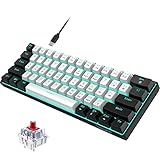
The Snpurdiri 60% is the smallest and cheapest way into a mechanical keyboard. It is a wired 60% board with red linear switches in a black-and-white finish. It suits a gamer with a very small desk who only needs the main typing block and function keys, a secondary setup, or a first board bought to test whether a 60% layout is liveable. It does not suit anyone who uses arrow keys constantly, anyone who needs a number pad, or anyone who types in a shared room and needs low noise plus reliability.
Key specs (as listed):
- Layout: 60% — main alphanumeric block and function layer only, no dedicated arrows or number pad
- Switch type: red linear
- Connection: wired
- Colour: black and white
- Keycaps: ABS at this tier
- Price tier: budget
A 60% layout is the most aggressive space saving available. Arrow keys, the function row and the navigation cluster all move onto a function layer, which means holding a modifier and pressing another key. That is fast once learned and genuinely annoying for the first week. The reward is a board roughly two-thirds the width of a full-size keyboard, which leaves a huge area for mouse movement — the main reason competitive players gravitate to small layouts.
Red linear switches are the sensible pairing here. They are light, smooth and quiet relative to clicky switches, which suits a small board used at close range. The ABS keycaps and the lack of hot-swap sockets are the expected compromises at the budget tier: this is a board you use until you decide you want something better, and it is priced accordingly. It is also a genuinely good travel or backup board, because there is almost nothing to break.
Pros
- Lowest-cost entry into a 60% mechanical layout
- Very small footprint leaves maximum mouse space
- Linear switches are smooth and relatively quiet
- Wired connection means no battery or pairing issues
- Light and easy to pack as a spare board
Cons
- No dedicated arrow keys — everything is on a function layer
- Not hot-swappable
- No number pad, and no room to add one
- ABS keycaps will wear and shine
How it compares: against the GEODMAER 65%, the Snpurdiri saves a little more desk space but gives up dedicated arrow keys — if you ever edit text or navigate spreadsheets, the 65% is the more practical budget choice. Against the MageGee MK-Box, both are compact, but the MK-Box sits a tier higher and adds a 68-key arrangement with arrow keys plus LED backlighting, which is worth the step up for most buyers.
9. MageGee Portable 60% Mechanical Gaming Keyboard – Best Compact for Small Desks

The MageGee MK-Box is the compact board to buy when portability and desk space matter more than a number pad, but you still want arrow keys. It is a 68-key mini board with LED backlighting, wired, in a form factor designed to be carried. It suits laptop users who want a real keyboard at a coffee shop or on a kitchen table, students in small rooms, and anyone whose desk is mostly monitor. It does not suit heavy spreadsheet users, and it is not the right board for someone who wants wireless.
Key specs (as listed):
- Layout: 68-key compact — main block plus arrow keys, no number pad and no separate function row
- Connection: wired
- Backlight: LED illuminated
- Design: portable, mini form factor
- Intended use: gaming and office typing
- Price tier: mid-range
The 68-key arrangement is the specific reason this board exists in this list. A pure 60% board drops the arrow keys onto a function layer, and while that is fine for gaming, it is genuinely awkward for editing text, filling in forms or moving a cursor through a spreadsheet. The 68-key layout keeps the arrows as physical keys while still cutting the number pad and the dedicated function row. That single decision makes it a far easier board to live with for a mixed work-and-play day than a strict 60%.
The LED backlight matters more on a compact board than people expect, because function-layer legends are printed on the key fronts and are hard to read in a dim room. Backlighting makes those secondary legends usable. The wired connection is the other sensible choice for a portable board: no charging, no pairing, and it works on any machine with a USB port, including ones where Bluetooth is locked down.
Pros
- Keeps physical arrow keys in a very small case
- Backlit legends make function-layer keys readable in low light
- Portable enough for a laptop bag
- Wired connection works everywhere without pairing
- Mid-range build quality without a full-size footprint
Cons
- No number pad
- Wired only
- Compact layouts always require relearning some muscle memory
- Not hot-swappable on this model line
How it compares: against the Snpurdiri 60%, the MK-Box costs more but adds arrow keys and backlighting — for almost every buyer that is the better trade, and the Snpurdiri only wins if the budget is the hard limit. Against the GEODMAER 65%, the two are close in size, but the MK-Box sits a tier higher in build and presentation while the GEODMAER is the budget-tier option with anti-ghosting as its main selling point.
10. RK ROYAL KLUDGE R98 Pro Wireless Mechanical Keyboard – Best Premium 96% for Mixed Use
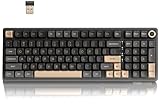
The R98 Pro is the premium board for someone who wants one keyboard to do everything and does not want to think about it again. It is a 96%-style layout with tri-mode connectivity — Bluetooth, 2.4 GHz and wired — RGB lighting and hot-swappable switches, tuned for a smooth, damped typing sound. It suits a professional who types all day and games at night, someone who switches between a desktop and a laptop, and a buyer who would rather spend once at the premium tier than buy three budget boards. It does not suit a buyer on a tight budget, and it does not suit someone who specifically wants a full-size 104-key layout.
Key specs (as listed):
- Layout: 96%-style — number pad retained, case shortened by compressing the nav cluster
- Connection: tri-mode — Bluetooth, 2.4 GHz wireless, wired
- Switches: hot-swappable
- Backlight: RGB
- Sound character: damped, “creamy” typing sound from internal foam and gasket-style construction on this model line
- Price tier: premium
The reason this board lands in the premium tier is the combination rather than any single feature. Wireless is common. Hot-swap is common. A 96% layout is common. Getting all three, plus RGB and a damped sound signature, in one board is what the extra money buys. For a single-keyboard household, that consolidation is the actual value — you stop maintaining a work board, a gaming board and a travel board.
Tri-mode connectivity is worth thinking through carefully before buying. The 2.4 GHz dongle is the mode to use for gaming; it wakes instantly and behaves close to a wired connection. Bluetooth is the mode for switching between a laptop, a tablet and a phone, and it is fine for typing but not for reaction-critical play. Wired mode is the fallback and the charging route. A board that offers all three is effectively immune to the “wrong choice” problem, because you can change modes rather than change keyboards.
Battery life is the one spec to check on the actual listing, because it varies enormously with backlight use. As a category rule, wireless mechanical boards with RGB run for a matter of days with lighting at full brightness and for weeks with it off, so plan on charging weekly if you leave the lights on.
Pros
- Tri-mode connectivity covers desktop, laptop and mobile
- 96% layout keeps the number pad in a shorter case
- Hot-swappable switches for repairs and feel changes
- Damped sound signature is less intrusive in a shared space
- RGB lighting with per-key control
Cons
- Premium price for a board most people could match with a cheaper wired model
- Battery is a long-term wear item
- RGB shortens runtime significantly
- Compressed nav cluster takes adjustment
How it compares: against the SOLAKAKA KI99 Pro, both are premium 96% wireless boards with hot-swap and RGB; the R98 Pro is the more understated, sound-focused option and the KI99 Pro is the more overtly gaming-oriented one. Against the AULA F99, the choice is again about feel rather than features — the F99 leans toward pre-lubed linear smoothness while the R98 Pro leans toward a damped, muted sound. Against the RK ROYAL KLUDGE R75, the R98 Pro adds wireless and a number pad but costs more and takes more desk space.
11. GEODMAER 65% Gaming Keyboard – Best Budget 65% with Arrow Keys

The GEODMAER 65% is the budget answer for a buyer who wants a small board but cannot live without arrow keys. It is a 68-key wired mini board with backlighting and anti-ghosting. It suits a first-time compact buyer, a student desk, a console-adjacent setup, and anyone who wants to test whether a small layout works for them before spending mid-range money. It does not suit someone who needs a number pad, and it does not suit someone who wants wireless or switch customisation.
Key specs (as listed):
- Layout: 65%, 68 keys — main block plus arrow keys, no number pad
- Connection: wired
- Backlight: LED illuminated
- Key rollover: anti-ghosting with no-conflict handling, so multiple simultaneous keypresses register correctly
- Design: ultra-compact mini form factor
- Price tier: budget
Anti-ghosting is the spec that matters most for gaming on a budget board. Ghosting happens when a keyboard’s internal matrix cannot resolve several simultaneous keypresses and reports a key that was never pressed — or drops one that was. On a full-size board with a number pad, the matrix is larger and the problem is more common. A compact 68-key board with no-conflict handling is much less likely to let you down during a diagonal movement plus ability plus reload combination, which is exactly the moment it would hurt.
The 65% layout is the practical compromise in this list. It keeps dedicated arrow keys, which a 60% board does not, and drops the number pad, which a 75% keeps. That makes it the smallest layout that still works comfortably for editing text, moving through a spreadsheet with the arrow keys, and general desktop navigation. The trade-off is that the function row is on a layer and the right-hand modifier column is compressed.
Pros
- Dedicated arrow keys in a very small footprint
- Anti-ghosting for reliable simultaneous keypresses
- Backlit for dim rooms
- Budget tier pricing
- Compact enough to leave desk space for a large mouse mat
Cons
- No number pad
- Not hot-swappable on this model line
- Wired only
- Function row lives on a layer
How it compares: against the Snpurdiri 60%, the GEODMAER costs slightly more but keeps physical arrow keys, which is the difference between a board you can work on and one you mostly game on. Against the MageGee MK-Box, both are 68-key compacts, but the MK-Box sits a tier higher in build and presentation while the GEODMAER is the budget pick with anti-ghosting as its headline feature.
12. RK ROYAL KLUDGE R75 Wired Mechanical Keyboard – Best 75% with a Volume Knob

The R75 is the 75% board for someone who wants a compact layout, a softer typing feel and a physical volume control. It is wired, gasket-mounted, hot-swappable, and it includes a rotary knob in the corner. It suits a home office user who adjusts volume constantly during calls and media, a gamer who wants a 75% layout with a cushioned keystroke, and anyone who has tried a 60% board and found it too cramped. It does not suit someone who needs a number pad, and it does not suit someone who wants a wireless desk.
Key specs (as listed):
- Layout: 75% — function row, arrow keys and a compact nav column, no number pad
- Connection: wired
- Control: rotary volume knob
- Mounting: gasket mount, which suspends the plate on soft material for a cushioned bottom-out
- Switches: hot-swappable
- Price tier: mid-range
Gasket mounting is the feature worth understanding before buying. On a conventional tray-mount board, the switch plate is screwed directly into the case, so every keystroke ends with a hard stop and the sound is brighter and more hollow. A gasket mount puts a soft material between the plate and the case, which absorbs some of that impact and produces a lower, softer typing sound. It is not a gimmick — for people who type for six or eight hours a day, the difference in how the board feels at the end of the day is noticeable.
The volume knob is a smaller feature with a disproportionate effect on daily use. If you take calls, watch video while working, or adjust game audio frequently, a physical dial is faster and more precise than a media key or an on-screen slider, and it does not require looking away from the screen. It is the kind of detail that makes a board feel purpose-built rather than generic.
Pros
- 75% layout keeps function row and arrow keys
- Gasket mount gives a softer, quieter keystroke
- Rotary volume knob for quick, precise audio control
- Hot-swappable switches for repairs and feel changes
- Mid-range price with enthusiast-adjacent features
Cons
- Wired only
- No number pad
- Compact nav column takes adjustment
- Knob placement is not to everyone’s taste
How it compares: against the AJAZZ AK820, the R75 adds a volume knob and a gasket mount for a higher mid-range price — the AK820 is the better value, the R75 is the better typing experience. Against the RK ROYAL KLUDGE R98 Pro, the R75 gives up wireless, RGB breadth and the number pad, but it is cheaper, smaller and lighter, and it keeps the same brand’s approach to hot-swap and build quality.
How to Choose
The fastest way to narrow twelve boards down to one is to answer four questions in order: how many keys do you actually press, what should a keypress feel and sound like, does the cable bother you, and how much noise can your room tolerate. Get those right and the price tier almost sorts itself out.
Step 1: Layout — count the keys you use, not the keys you have
Layout is the decision that is hardest to reverse, because it changes muscle memory rather than just feel. The practical key counts are consistent across the category:
- 60% (about 61 keys): main alphanumeric block plus a function layer. No dedicated arrows, no number pad, no separate function row. Smallest footprint, most relearning. Best for pure gaming or a secondary board.
- 65% (about 68 keys): adds dedicated arrow keys to the 60% block. The smallest layout that is comfortable for editing text and general desktop use.
- 75% (about 80-84 keys): adds a function row and a compact navigation column. The most popular compromise — you lose only the number pad.
- TKL (87 keys): full function row, full navigation cluster, no number pad.
- 96% (about 96-100 keys): every key of a full-size board, with the nav cluster compressed so the case is shorter and narrower.
- Full-size (104 keys): everything in its traditional position, including a full number pad and full navigation cluster.
If you enter numbers into a spreadsheet for a living, a 96% or full-size board is the only sensible answer, because a separate number pad takes up as much space as the keys you removed. If you never touch the number pad, a 75% saves roughly a third of the width of a full-size board — enough to matter on a desk that also holds a monitor, a lamp and a mouse mat. If you use arrow keys constantly, do not buy a 60% board; the function-layer arrows will frustrate you within a week. That single rule eliminates the Snpurdiri 60% for most buyers and points you toward the MageGee MK-Box or the GEODMAER 65% instead.
Step 2: Switch feel — linear, tactile or clicky
Switch type determines how the key responds and how loud it is. Three families cover almost everything in this roundup:
- Linear (red, black): smooth travel with no bump and no click. Reds are light and are the default recommendation for fast gaming; blacks are heavier and reduce accidental presses. Quietest of the three mechanical families in normal use.
- Tactile (brown-style): a bump you feel at the actuation point with no click. The best all-round choice for typing, because the bump tells your finger when to stop pressing.
- Clicky (blue-style): a bump plus an audible click. The most satisfying feedback and by far the loudest. Fine in a room of your own, a poor choice in an open-plan office or a shared bedroom.
Switch weight matters as much as switch family. A light linear spring is comfortable for fast repeated taps but easy to trigger accidentally; a heavier spring is more deliberate but tiring over an eight-hour day. If you are unsure, start with a light linear or a medium tactile and treat hot-swap sockets as insurance — a board with sockets lets you change your mind for the